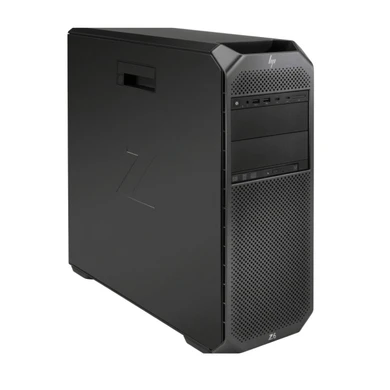
HP Workstations · Z-Series

The HP Z6 G4 is HP’s dual-socket-capable Z-series tower, sitting between the single-socket Z4 G4 and the higher-end dual-socket Z8 G4. It ships single-CPU by default and can be configured with a second Intel Xeon Scalable processor, giving it a wider performance ceiling than the Z4 G4 for rendering, simulation, and other workloads that scale across multiple sockets. TekBoost stocks the Z6 G4 configure-to-order, refurbished and functionally tested, with your choice of 1st- or 2nd-generation Intel Xeon Scalable processors.

Starting at $299.00 · In stock · Ships in 2–7 business days

Configure Your Z6 G4 Request a Quote

Single-CPU vs. Dual-CPU: What Changes

The Z6 G4 supports up to two Intel Xeon Scalable processors in one chassis. When you configure a second CPU through TekBoost’s builder, a second-processor installation kit is automatically included, so your build arrives ready to run in a dual-socket configuration rather than needing a separate upgrade later. Both Intel Xeon Scalable generations are available: 1st Gen (“Skylake-SP”) and 2nd Gen (“Cascade Lake-SP”), covering everything from entry-level Bronze SKUs up to high-core-count Platinum SKUs, so you can size the CPU tier to your workload and budget independently of whether you need one socket or two.

CPU Generations Available

1st Gen Xeon Scalable 2nd Gen Xeon Scalable
CPU tier range at TekBoost Xeon Bronze 3104 up to Xeon Platinum 8180 Xeon Bronze 3204 up to Xeon Platinum 8280
Configuration Single- or dual-socket Single- or dual-socket
Memory type DDR4 Registered ECC DDR4 Registered ECC

CPU tiers and pricing reflect TekBoost’s live configure-to-order catalog and change as inventory turns — see the configurator for current SKUs and pricing.

Memory

The Z6 G4 uses DDR4 Registered ECC memory, with available capacity scaling based on how many processors your build includes — TekBoost’s configurator offers 8GB, 16GB, 32GB, and 64GB DIMM options and will only present memory choices once your processor quantity is selected. If you have a specific total-memory target, tell us when you request a quote and we’ll confirm the exact maximum for your chosen single- or dual-CPU configuration.

Professional Graphics & Expansion

The Z6 G4 chassis is built to carry professional GPU horsepower for simulation, visualization, and content-creation work. TekBoost’s configurator offers professional NVIDIA Quadro (M- and P-series), Quadro RTX, and RTX A-series cards up to the RTX A5500, plus consumer-class GeForce RTX 30-series options up to the RTX 3090 Ti for teams that want gaming-adjacent rendering performance on a budget. Note that TekBoost does not currently offer NVIDIA RTX 40-series or 50-series cards on the Z6 G4: beyond simply not being in our catalog, HP Support Community threads from January and March 2026 report boot/POST failures pairing RTX 50-series cards with this platform, so compatibility with the newest GPU generations should be treated as unresolved rather than assumed. Two power supply tiers are available through TekBoost’s configurator — a 700W standard option and a 1000W upgrade — tell us your target GPU configuration when you request a quote and we’ll confirm the right PSU tier for your build.

Built And Tested Before It Ships

Every TekBoost Z6 G4 is inspected, configured to your exact specification, and functionally tested before it leaves our facility. Every build includes a 3-year TekBoost warranty standard, with a 5-year extended option available at checkout.

How The Z6 G4 Compares

Model Sockets Starting price Best for Configure
HP Z2 Tower G9 Single $949.00 Compact single-CPU workstation with current-gen Intel platform Configure →
HP Z4 G4 Single $299.00 Budget-focused CAD, drafting, and engineering Configure →
HP Z6 G4 Dual $299.00 Rendering, simulation, larger assemblies needing more cores/RAM — this page Configure →
HP Z8 G4 Dual $999.00 Maximum core count, heaviest professional workloads Configure →

The core trade-off versus the Z8 G4: the Z6 G4 gives up some top-end core-count and expansion headroom in exchange for a lower entry price at the same $299.00 starting point as the single-socket Z4 G4 — a good fit when you want dual-socket scalability without the Z8 G4’s higher cost, or when you’re not sure yet whether your workload needs a second CPU and want the option to add one later.

Frequently Asked Questions

Does the HP Z6 G4 support two CPUs?

Yes. The Z6 G4 ships single-CPU by default and can be configured with a second Intel Xeon Scalable processor. When you select a second CPU through TekBoost’s builder, a second-processor installation kit is automatically included so the build arrives ready to run in a dual-socket configuration.

What is the maximum RAM in the HP Z6 G4?

The Z6 G4 uses DDR4 Registered ECC memory, and TekBoost’s configurator offers 8GB, 16GB, 32GB, and 64GB DIMM options, with total capacity scaling based on how many processors your build includes. Tell us your target memory total when you request a quote and we’ll confirm the maximum for your specific single- or dual-CPU configuration.

Can the HP Z6 G4 run modern RTX 40-series or 50-series graphics cards?

We don’t currently offer RTX 40-series or 50-series cards on the Z6 G4, and we’d treat compatibility as unresolved rather than assumed — HP Support Community threads from January and March 2026 report boot/POST failures pairing RTX 50-series cards with this platform. TekBoost’s configurator tops out at the NVIDIA RTX A5500 and GeForce RTX 3090 Ti, which are well-qualified options for this chassis. If a newer-generation card is a hard requirement, ask us about a newer platform.

What’s the difference between the HP Z6 G4 and the HP Z4 G4?

The Z4 G4 is single-socket only. The Z6 G4 ships single-CPU by default but supports a second Intel Xeon Scalable processor for workloads that scale across two sockets. Both start at $299.00 through TekBoost; the right choice depends on whether your software benefits from a second CPU versus prioritizing single-core clock speed and a smaller footprint.

Is the HP Z6 G4 good for CAD, rendering, or simulation work?

Yes — its dual-socket capability makes it a strong fit for rendering, simulation, and other workloads that scale across multiple CPUs. See our full guide to choosing a CAD/BIM workstation for how the Z6 G4 compares to TekBoost’s other workstation options.

What power supply does the HP Z6 G4 use?

TekBoost’s Z6 G4 configurator offers a 700W standard power supply and a 1000W upgrade option. Tell us your target CPU and GPU configuration when you request a quote and we’ll confirm the right PSU tier for your build.