
Dell PowerEdge R740
A 2U platform with room to explore storage and expansion options. Compare platform specifications, then select your configuration.
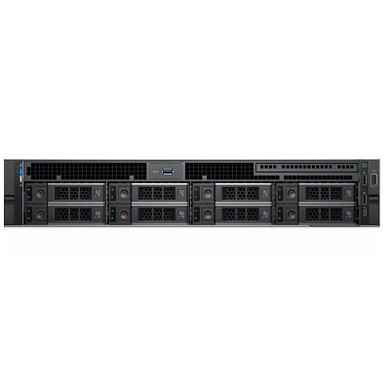
Buying the Dell PowerEdge R740
Our refurbished CTO systems offer TekBoost’s best value and are the models we sell most commonly. Use the configurator to select the available processors, memory, storage and other options. Review the final configuration and price before ordering.
Need an option outside the configurator? Send a custom quote request with the model and required components.
Platform specifications
These are platform capabilities and documented options. Match the exact processor, chassis and installed components to the applicable manufacturer document.
| Processors | Up to two supported 1st or 2nd Generation Intel Xeon Scalable processors. The hosted sheet describes 2nd Generation options up to 28 cores per processor; confirm the exact CPU and BIOS requirements. |
|---|---|
| Memory | 24 DDR4 ECC RDIMM/LRDIMM slots; the sheet lists up to 2933 MT/s and 3 TB DRAM. CPU and DIMM configuration determine the achievable capacity and speed. |
| Storage | Front configurations include up to 16 × 2.5-inch or 8 × 3.5-inch drives. R740xd drive layouts are not interchangeable with these specifications. |
| Controllers | The sheet lists PERC H330, H730P, H740P, HBA330 and S140 software RAID, with separate boot and external controller options. |
| Expansion | PCIe Gen 3 riser options. Review the installed risers, processor count and adapter placement before adding cards. |
| Management and power | iDRAC9; hot-plug power supply options. Verify PSU wattage and input requirements for the selected build. |
Dell PowerEdge R740 specifications PDF
Download the manufacturer document hosted by TekBoost. Check the revision inside the PDF; archived editions may cover different options from later releases.
Plan a complete configuration
Processor & memory
Match your application requirements to the supported processor family. Verify DIMM type, occupied slots and population rules; installed CPU count can affect available memory and expansion.
Storage & expansion
Confirm drive size, backplane, controller, carriers and cables. Check risers, PCIe slot availability and network requirements before selecting upgrades.
Condition & delivery
Compare the complete configured price, warranty terms and lead time. Include your quantity, destination and preferred condition when requesting a quote.
Common questions
Can I configure and buy this model online?
Yes. Use Configure & Buy to open the current CTO listing and choose its available options. Contact us for requirements outside that listing.
Does the specification sheet describe my exact system?
No. It describes platform options for its document edition. Check your installed processor, memory, chassis, controller, power supply and expansion components before selecting parts.
PowerEdge R740 or R740xd — which should I choose?
Both are 2U, 14th-generation, dual-socket platforms. Both support up to two Intel Xeon Scalable processors with up to 28 cores each and provide 24 DDR4 DIMM slots, so processors and memory are not the deciding factor — the difference is drive capacity and expansion.
The R740’s documented front layouts reach up to 16 × 2.5-inch or 8 × 3.5-inch drives. The R740xd’s reach up to 24 × 2.5-inch or 12 × 3.5-inch, with mid and rear bay options that depend on the chassis, and riser configurations supporting up to eight PCIe Gen 3 slots. Choose the xd when drive count, not compute, is the constraint.
Drive layouts are not interchangeable between the two, so confirm the backplane, drive cages, cabling and controller together rather than reading across from a bay count — and note that a bay count alone does not establish NVMe support. Configure an R740 or an R740xd, or review the full documented options on the R740xd specifications page.
Which network daughter card should I choose for an R740?
The R740 configurator lists the Network Daughter Card as a required selection, so this is a decision every build has to make. The options fall into three connection types rather than a simple fast-or-slow scale:
- 1GbE Base-T — Intel I350 4x 1GbE, or Broadcom 5720 4x 1GbE. Standard RJ45 on Cat5e/Cat6 cabling.
- 10GbE Base-T — Intel X540 or X550 with 2x 10GbE plus 2x 1GbE, Intel X550 with 4x 10GbE, or Broadcom 57800S with 2x 10GbE plus 2x 1GbE. Also RJ45, but needs a 10GBASE-T switch port.
- 10GbE SFP+ — Intel X520 or Broadcom 57800S with 2x 10GbE SFP+ plus 2x 1GbE, or Broadcom 57412 with 2x 10GbE SFP+ plus 2x 1GbE. SFP+ ports take a transceiver or a direct-attach copper cable, which is bought separately.
The deciding factor is what your switch accepts, not the card vendor. A 10GbE SFP+ card connected to an RJ45-only switch is not usable without additional optics, and a 10GBASE-T card on a 1GbE switch simply negotiates down to 1Gb. If the switching has to change alongside the server, we also supply networking equipment by quote.
Port count is the second consideration. Several of the 10GbE options add two 1GbE Base-T ports alongside the 10GbE pair, which is useful if you want management or backup traffic on a separate physical link without spending a 10GbE port on it.
These are the options this platform offers, not the card included in any particular quoted configuration. If you are weighing whether to commit now, see whether the card can be changed later on the R640 page — the answer applies to the R740 as well. Configure a PowerEdge R740, and note that networking is covered by our standard 3-year warranty.
Compare related systems
Dell PowerEdge R440
A compact rack platform that saves vertical rack space. Compare platform specifications, then select your configuration.
Dell PowerEdge R540
A 2U platform with room to explore storage and expansion options. Compare platform specifications, then select your configuration.
Dell PowerEdge R640
A compact rack platform that saves vertical rack space. Compare platform specifications, then select your configuration.
Choose your next step
Configure a common refurbished platform for the best value, or request a quote around your workload.
Compare this platform
These comparisons set out the chassis configurations each platform was built in, and what the differences mean in practice.